Use your forum account to login.

LOGIN

TOP Contributors

  1. MikroElektronika Team (99 codes)
  2. Dany (44 codes)
  3. NART SCHINACKOW (34 codes)
  4. Alcides Ramos (33 codes)
  5. Agent Wolfz (14 codes)
  6. Andrew Hazelden (13 codes)
  7. Roman Black (11 codes)
  8. Alberto Trasimeni (11 codes)
  9. Roman Toropov (9 codes)
  10. Simon Platten (8 codes)

Most Downloaded

  1. Network Ethernet Library (11743 times)
  2. FAT32 Library (8597 times)
  3. Timer Calculator (6519 times)
  4. PID Library (5239 times)
  5. Network WiFi Library (5190 times)
  6. SMS home alarm system (4414 times)
  7. External Memory (4105 times)
  8. mikromedia for PIC18FJ - Examples (3564 times)
  9. microSD click - Example (3486 times)
  10. GPS click - Example (3247 times)
Libstock prefers package manager

Package Manager

We strongly encourage users to use Package manager for sharing their code on Libstock website, because it boosts your efficiency and leaves the end user with no room for error. [more info]

< Back
Project

Tool: Global variable usage

Rating:

Author: Dany

Last Updated: 2012-07-28

Category: Other Codes

Downloaded: 215 times

Not followed.

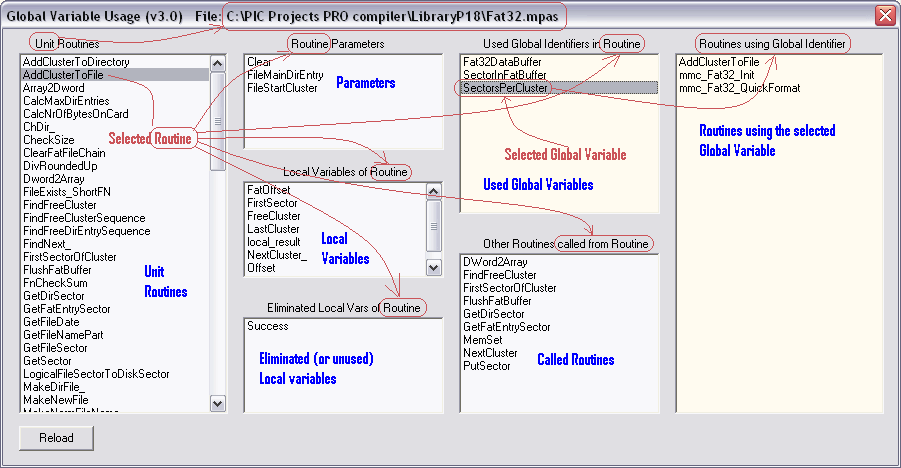
Shows, from a selected routine, the following items:
- The parameters
- The (used) local variables
- The unused local variables (eliminated by optimiser)
- The used global variables
- Called routines

For mP and mB, PIC and dsPIC.

No Abuse Reported

Do you want to subscribe in order to receive notifications regarding "Tool: Global variable usage" changes.

Do you want to unsubscribe in order to stop receiving notifications regarding "Tool: Global variable usage" changes.

Do you want to report abuse regarding "Tool: Global variable usage".

  • Information
  • Comments (6)
Download

Download Project [324.64KB]

Version 1.0.0.0

DOWNLOAD LINK RELATED COMPILER CONTAINS
Other Compiler
  • lib
  • src
  • exa
  • hlp
  • hex
  • sch
  • pcb
  • doc

Project Blog

For mP and mB, PIC and dsPIC.

* Shows, from a selected routine, the following items:

  • The parameters
  • The (used) local variables
  • The unused local variables (eliminated by optimiser)
  • The used global variables
  • Called routines

* Shows also which routines use a selected Global variable.

IMPORTANT:

- Be sure that "Include Source Lines in the Output Files and Generate Listfile, include debug info" is checked in menu Tools -> Options -> Output -> OutputSetting.

- The tool is to be started up from within the IDE, it can not be used stand alone.

- Compile the project before tool usage.
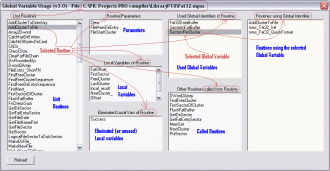
ScreenShot

ScreenShot

Screenshot

View full image
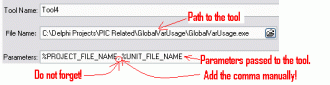
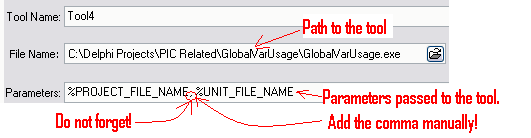
Tool settings in the IDE (Options-Tools)

Tool settings in the IDE (Options-Tools)

Tool settings in the IDE (Options-Tools)

View full image

ALSO FROM THIS AUTHOR

Telnet to RS232

This device (hard and software) can be used to control up to 6 RS232 devices via Telnet (Ethernet). Uses the Ethernet ENC library v3_5 from Yo2Lio.

[Learn More]

Tool: Project configuration in text format

Tool that shows the project's configuration words content (in a readable format), the MCU type and the MCU clock frequency. This permits to add (part of) the configuration settings in a comment box in your project.
For mP, mC and mB for PIC, dsPIC and PIC32.

[Learn More]

TempSensors

The basic functions for the DS1820 (digital temperature sensor), including string output, ready to display. A routine to convert a temperature read from a DS18B20 to a string (to e.g. display on an LCD) is also present.

[Learn More]