We strongly encourage users to use Package manager for sharing their code on Libstock website, because it boosts your efficiency and leaves the end user with no room for error. [more info]

Rating:
Author: dany
Last Updated: 2018-03-02
Package Version: 5.2.0.0
Category: Other Codes
Downloaded: 1018 times
Followed by: 1 user
License: MIT license
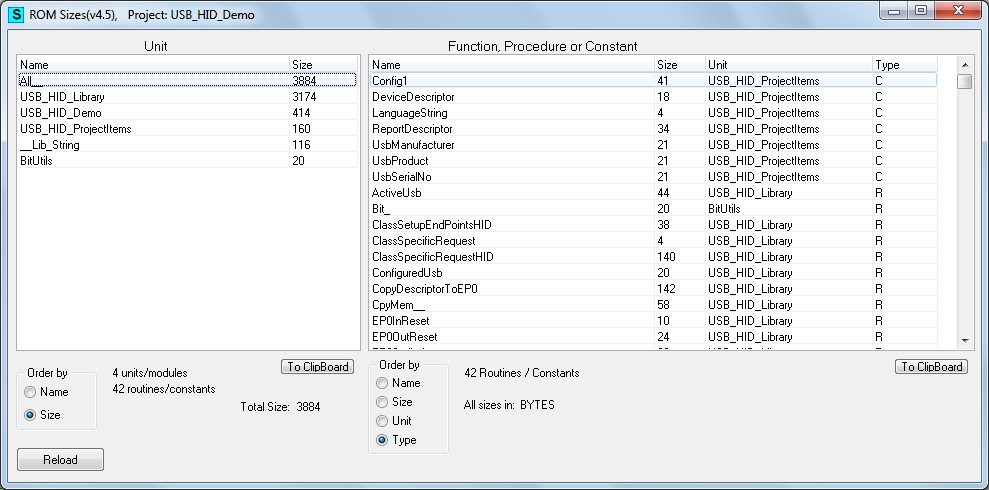
This tool shows the romsize of all units of a project together with rom-size details of a selected unit.
For mP, mC and mB for PIC, dsPIC and PIC32.

Do you want to subscribe in order to receive notifications regarding "Tool: RomSizes" changes.
Do you want to unsubscribe in order to stop receiving notifications regarding "Tool: RomSizes" changes.
Do you want to report abuse regarding "Tool: RomSizes".
| DOWNLOAD LINK | RELATED COMPILER | CONTAINS |
|---|---|---|
| 1520002183_tool__romsizes_other_pic.zip [263.73KB] | Other PIC Compilers |
|
| 1520002203_tool__romsizes_other_pic24.zip [263.73KB] | Other PIC24 Compilers |
|
| 1520002219_tool__romsizes_other_pic32.zip [263.73KB] | Other PIC32 Compilers |
|
For mP, mC and mB for PIC, dsPIC and PIC32.
This tool shows the romsize of all units of a project together with rom-size details of a selected unit.
IMPORTANT:
- Be sure that "Include Source Lines in the Output Files, Include ROM Constants and Generate Listfile, include debug info" is checked in menu Tools -> Options -> Output -> OutputSetting.
- The tool is to be started up from within the IDE, it can not be used stand alone.
- Compile the project before tool usage.
More Details...

2016-06-17: version 4.9: for the P24/P30/P33 Pic's: corrected the rom sizes (given by the compiler) to rom sizes in bytes, see http://www.mikroe.com/forum/viewtopic.php?f=107&t=33036&hilit=romsize.
---------------------------------------------------------------------------------------------------------------------------------------------
Version 5.0: added the address of the ROM item.
---------------------------------------------------------------------------------------------------------------------------------------------
Version 5.1: Corrected an error in the constant sizecalculation for PIC24-dsPic30/33. --------------------------------------------------------------------------------------------------------------------------------------------
Decided to go back to version 5.0: this version shows the actual rom size in bytes used by constants (= 1.5 times bigger that the declaration in mP/mB) for OIC24 and P30/33. For these types of MCU's constants use only 2 bytes per 2 addresses, where 3 bytes per 2 addresses are available.
------------------------------------------------------------------------------------------------------------------------------------------
Version 5.1: Sorting on size of the modulelist corrected.
Version 5.3: Addresses > $FFFF are sorted correctly now.