20%
We strongly encourage users to use Package manager for sharing their code on Libstock website, because it boosts your efficiency and leaves the end user with no room for error. [more info]

Rating:
Author: MIKROE
Last Updated: 2019-03-11
Package Version: 1.0.0.1
mikroSDK Library: 1.0.0.0
Category: Temperature & humidity
Downloaded: 10860 times
Followed by: 1 user
License: MIT license
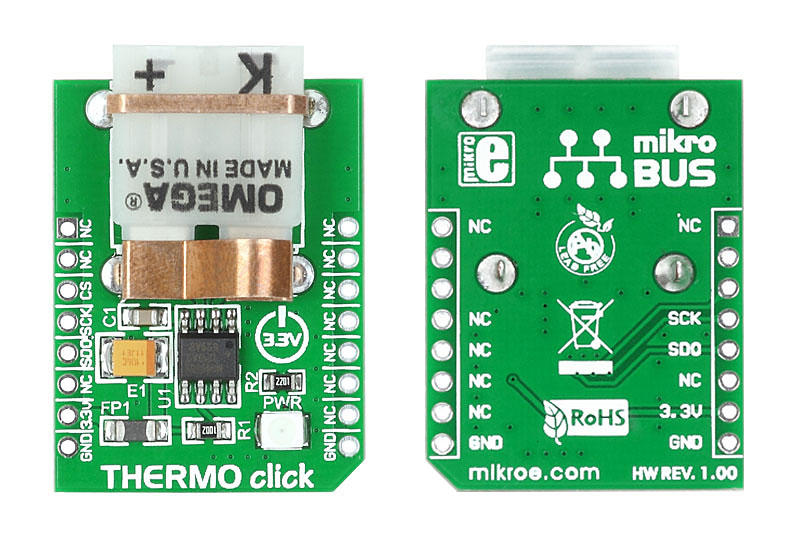
Example for Thermo click board in mikroBUS form factor. It is a simple demonstration of how to read the temperature from a thermocouple. It uses MAX31855 chip for Thermocouple-to-Digital conversion. Displayed temperature is in degree Celsius.

Do you want to subscribe in order to receive notifications regarding "Thermo click" changes.
Do you want to unsubscribe in order to stop receiving notifications regarding "Thermo click" changes.
Do you want to report abuse regarding "Thermo click".
Front and back view of THERMO click board designed in mikroBUS form factor. mikroBUS is specially designed pinout standard with SPI, I2C, Analog, UART, Interrupt, PWM, Reset and Power supply pins.
View full imageLibrary Description
The library covers all the necessary functions to control the Thermo Click board.
Library performs the communication with the device via SPI driver by reading data from the MAX31855 sensor. A library has a function for measuring thermocouple temperature and converts to degree Celsius and function for checking the error: short-circuited to Vcc, short-circuited to GND or no connections.
Key functions:
uint8_t thermo_checkFault()- Check fault states function.Examples description
The application is composed of three sections:
void applicationTask()
{
    temperature = thermo_getTemperature();
    FloatToStr( temperature, logText );

    mikrobus_logWrite( " Temperature : ", _LOG_TEXT );
    mikrobus_logWrite( logText, _LOG_TEXT );
    mikrobus_logWrite( degCel, _LOG_LINE );
    mikrobus_logWrite( "---------------------------", _LOG_LINE );

    Delay_ms( 3000 );
}
Additional Functions :
Other mikroE Libraries used in the example:
SPIUARTConversionAdditional notes and informations
Depending on the development board you are using, you may need USB UART click, USB UART 2 click or RS232 click to connect to your PC, for development systems with no UART to USB interface available on the board. The terminal available in all MikroElektronika compilers, or any other terminal application of your choice, can be used to read the message