
We strongly encourage users to use Package manager for sharing their code on Libstock website, because it boosts your efficiency and leaves the end user with no room for error. [more info]

Rating:
Author: Andrew Hazelden
Last Updated: 2012-05-20
Package Version: 1.0.0.0
Category: Other Codes
Downloaded: 861 times
Not followed.
License: MIT license
The Midnight Blue color scheme is used to customize the syntax highlighting in mikroC Pro.
I created this color scheme to make the mikroC programming experience even better. The scheme is designed to work with all of the MikroElektronika MikroC Pro compilers.

Do you want to subscribe in order to receive notifications regarding "Midnight Blue Color Scheme for mikroC Pro" changes.
Do you want to unsubscribe in order to stop receiving notifications regarding "Midnight Blue Color Scheme for mikroC Pro" changes.
Do you want to report abuse regarding "Midnight Blue Color Scheme for mikroC Pro".
| DOWNLOAD LINK | RELATED COMPILER | CONTAINS |
|---|---|---|
| 1337561437_midnight_blue_co_mikroc_pic32.zip [235.32KB] | mikroC PRO for PIC32 |
|
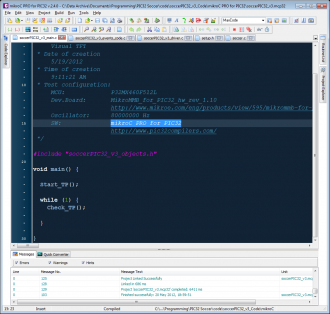
Midnight Blue is a new syntax highlighting color scheme for mikroC Pro.
View full imageThe Midnight Blue color scheme is used to customize the syntax highlighting in mikroC Pro.
I created this color scheme to make the mikroC programming experience even better. The color palette for Midnight Blue was partially inspired from the dark "Ruby Blue" theme included with notepad++. The scheme is designed to work with all of the MikroElektronika MikroC Pro compilers and has been tested with the mikro C Pro for PIC, mikro C Pro for dsPIC, and mikro C Pro for PIC32 compilers.
Tip: I think mikroC looks pretty spiffy when you combine the mikroC "Office XP" style with the "Midnight Blue" Color Scheme!
Midnight Blue Version 1.0
Released May 20, 2012
Install the Midnight Blue Color Scheme by copying the file Midnight Blue.col from the "Install" folder into the mikroC Pro program directory.
For example, on Windows 7, the mikroC Pro for PIC32 program directory is located at:
C:\Users\Public\Documents\Mikroelektronika\mikroC PRO for PIC32
For example, on Windows XP, the mikroC Pro for PIC32 program directory is located at:
C:\Program Files\Mikroelektronika\mikroC Pro for PIC32
Start by launching mikroC Pro. Go to the Tools menu and select the "Options" menu item.
In the Options window, click on the Editor tab and select the "Style" icon. In the IDE Style section set the IDE Style to "Office XP".
Next, click on the Editor Colors tab. Set the Current Scheme to "Midnight Blue".
Click Okay.
A MikroElektronika mikro C Pro Compiler:
http://www.mikroe.com/eng/categories/view/97/mikroc/
Note: The color scheme is compatible with the free versions of mikroC Pro.
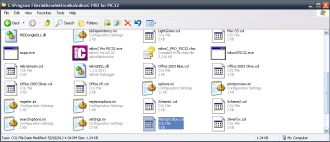
All you have to do to use the new color scheme is drop the file Midnight Blue.col in the mikroC Pro folder.
View full image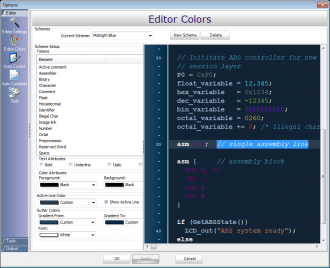
The Midnight Blue color scheme is enabled using the Edit Colors section of the Options windows.
View full image


